In Konica Minolta bizhub color multifunction systems, the Transfer Belt Unit—commonly referred to as the Intermediate Transfer Belt (ITB)—is a core image-formation component. Its role is not cosmetic, nor auxiliary; it is structurally essential for accurate color reproduction, stable image transfer, and precise registration between colors.
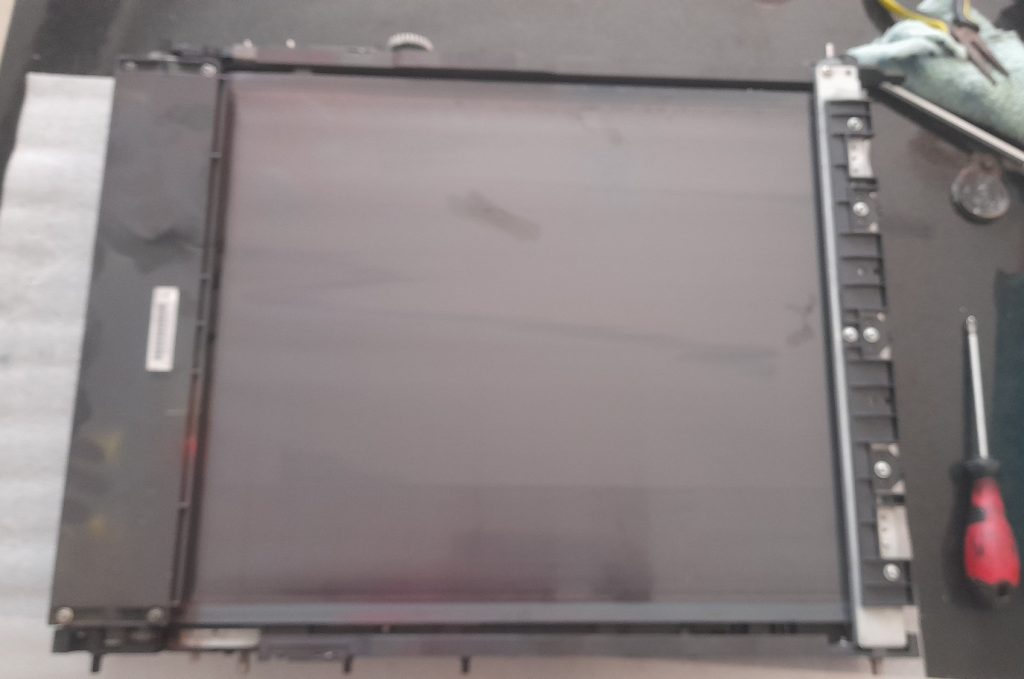
Any malfunction or contamination of the Transfer Belt Unit directly manifests as image quality defects, often misdiagnosed as drum, developer, or fusing issues. A correct understanding of this unit is therefore critical for advanced troubleshooting.
1. What Is the Transfer Belt Unit?
The Transfer Belt Unit is a continuous, electrically controlled belt assembly positioned between the drum units and the paper path.
Primary Purpose:
- To collect toner images from individual color drums (C, M, Y, K)
- To combine them into a single composite image
- To transfer the full-color image onto paper in one precise step
This process is called intermediate transfer, hence the name Intermediate Transfer Belt.
2. Role in the Image Formation Process
In a color bizhub machine, the image formation sequence is as follows:
- Laser writes separate latent images on each drum (C, M, Y, K)
- Developer units develop each image with toner
- Each drum transfers its toner image onto the transfer belt
- The belt carries the combined image forward
- Secondary transfer roller transfers the image from the belt to paper
- Paper proceeds to the fusing unit
Key Insight:
The transfer belt is the only point in the system where all colors coexist physically before reaching the paper.

Any instability here affects all colors simultaneously.
3. Main Components of the Transfer Belt Unit
A typical Konica Minolta bizhub Transfer Belt Unit includes:
3.1 Transfer Belt (ITB Film)
- Made of a special conductive polymer
- Precisely engineered for:
- Controlled resistivity
- Mechanical stability
- Heat and toner resistance
3.2 Belt Drive Rollers
- Drive roller (motor-driven)
- Tension roller
- Tracking roller
These ensure:
- Correct belt speed
- No lateral drift
- Constant surface tension
3.3 Primary Transfer Rollers
- One per color drum
- Apply transfer voltage to pull toner from drum to belt
3.4 Secondary Transfer Roller
- Transfers toner from belt to paper
- Works with high-voltage bias synchronized to paper arrival
3.5 ID Sensors (Image Density Sensors)
- Positioned near the belt surface
- Measure toner patches for:
- Density control
- Color balance
- Automatic calibration
3.6 Cleaning System
- Blade or brush (model dependent)
- Removes residual toner from the belt surface
4. Electrical and Electrostatic Principles
The Transfer Belt Unit operates entirely on controlled electrostatic forces.
Key Voltages Involved:
- Primary transfer bias (Drum → Belt)
- Secondary transfer bias (Belt → Paper)
- Belt surface reference potential
Critical Principle:
Toner moves only because of electric potential differences, not mechanical contact.
If any voltage is unstable, leaking, or incorrectly biased:
- Toner may remain on the drum
- Toner may scatter on the belt
- Toner may fail to transfer to paper
5. Common Image Quality Defects Caused by the Transfer Belt
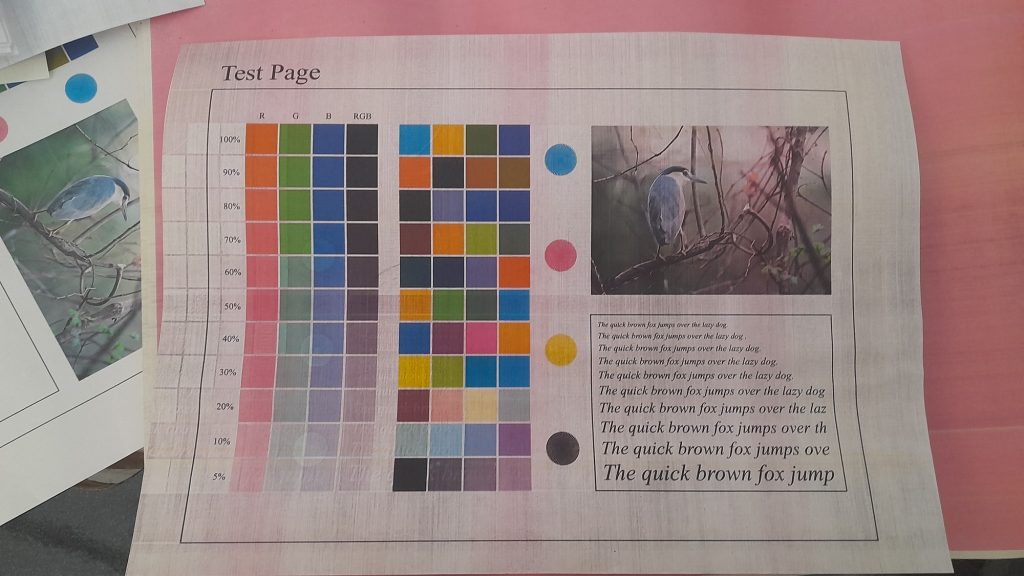
5.1 Background (Gray or Color Fog)
Typical Causes:
- Contaminated belt surface
- Improper belt potential
- Weak cleaning blade
5.2 Color Misregistration
Typical Causes:
- Belt speed inconsistency
- Belt tracking issues
- Mechanical deformation of belt rollers
5.3 Repeating Defects
Defects repeating at belt circumference interval indicate:
- Physical damage on belt surface
- Toner buildup at a fixed point
5.4 Incomplete Color Transfer
Symptoms:
- Faded colors
- Missing one color partially
- Uneven density across page
Often misdiagnosed as:
- Drum failure
- Developer failure
Actual cause:
- Transfer belt bias or surface condition
6. Diagnostic Logic for Technicians
Step 1: Visual Inspection
- Look for toner haze on belt
- Scratches or dull areas
- Toner accumulation near edges
Step 2: Check ID Sensor Readings
- Abnormal or unstable ID values often point to belt contamination
Step 3: Belt Cleaning Test
- Clean belt and retest
- If problem disappears temporarily → belt or cleaning system issue
Step 4: Transfer Bias Verification
- Inspect HV contacts
- Look for toner contamination causing voltage leakage
7. Why Transfer Belt Problems Are Often Misdiagnosed
Many technicians incorrectly blame:
- Drum units
- Developer units
- Toner quality
This happens because:
- The belt is not directly visible during printing
- Its defects affect all colors simultaneously
- Symptoms mimic other unit failures
Professional Rule:
If a defect appears in multiple colors with identical geometry, suspect the Transfer Belt Unit first.
8. Maintenance and Service Considerations
- Never touch belt surface with bare hands
- Avoid alcohol unless specified by service manual
- Replace belt unit at manufacturer-recommended life
- Always clean HV contacts during belt replacement
Conclusion
The Transfer Belt Unit is the silent integrator of the entire color imaging system in Konica Minolta bizhub machines. It does not create the image, but it decides whether the image survives intact until it reaches the paper.
A deep understanding of:
- Its electrostatic role
- Its mechanical stability
- Its interaction with drums, developers, and sensors
allows a technician to:
- Diagnose faster
- Avoid unnecessary part replacement
- Solve complex color issues with confidence