
Ghosting on Konica Minolta copiers occurs when residual electrostatic charge or unfixed toner from a previous print cycle is unintentionally re-transferred onto subsequent pages. This is not a software error; it is a failure in the image reset and transfer efficiency stages of the electro-photographic process, most commonly involving the OPC drum, fusing system, or transfer belt.
⚙️ Technical Anatomy
Understanding Ghosting at First Principles
In a healthy Konica Minolta copier, every print cycle is electrically independent. After an image is transferred, the system must:
- Remove residual toner from the OPC drum (cleaning phase).
- Neutralize residual electrical charge (discharge phase).
- Prevent re-transfer of previously fused toner (fusing integrity).
Ghosting occurs when memory remains in the system—either as residual charge, toner, or heat-induced offset.
Analogy:
Ghosting is like writing on a whiteboard that was never fully erased. Even when you write new text, faint shadows of the old writing still appear.
🧠 Root Causes of Ghosting (Ordered by Probability)
1. OPC Drum Residual Charge Retention
First-principle failure: Incomplete neutralization of the drum surface after image transfer.

If the erase lamp or discharge system is ineffective:
- Portions of the previous latent image remain electrically “visible.”
- These areas attract toner again in the next cycle.
Typical triggers:
- Aged or fatigued OPC coating
- Faulty erase LED or lamp
- Charge unit contamination
Key indicator:
Ghost images repeat at exact drum circumference intervals.
2. Inadequate Drum Cleaning
First-principle failure: Mechanical removal of residual toner is incomplete.
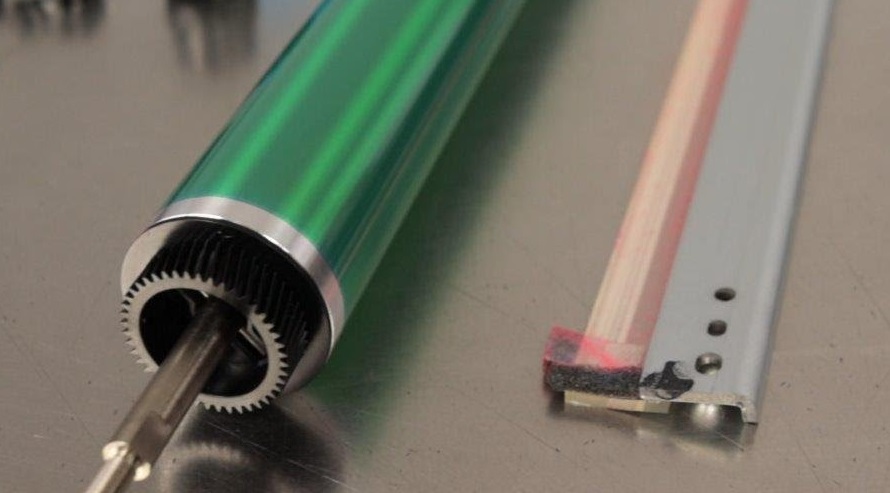
Residual toner particles left on the drum are:
- Carried into the next rotation.
- Re-developed faintly onto the paper.
Causes include:
- Worn or hardened cleaning blade
- Toner overflow due to abnormal density control
- Drum surface damage preventing blade sealing
This typically produces lighter, less defined ghost images.
3. Fuser Toner Offset and Re-Transfer
First-principle failure: Toner partially melts but does not fully bond to the paper.
Unfused toner:
- Adheres temporarily to the fuser roller.
- Transfers back onto subsequent sheets.
Contributing factors:
- Low fusing temperature
- Damaged fuser coating
- Excessive print speed for paper type
Diagnostic insight:
Ghosting caused by the fuser often worsens after continuous printing as heat builds.
4. Transfer Belt Memory Effect (Color Models)
First-principle failure: Surface resistivity imbalance on the transfer belt.
If the belt retains:
- Toner residue, or
- Electrostatic potential from previous images,
it can redeposit faint replicas onto following prints.
This type of ghosting may appear color-specific.
5. Environmental and Media Factors
First-principle failure: Charge dissipation disturbed by ambient conditions.
- High humidity reduces electrostatic decay predictability.
- Low-quality or coated paper can reject toner during transfer and fusing.
These factors rarely cause ghosting alone but can amplify existing weaknesses.
🛠️ Field Action Plan
- Print Sequential Solid Test Pages ← Confirms ghost image alignment and repetition.
- Measure Ghost Image Interval ← Correlates defect to drum or fuser circumference.
- Inspect Drum Surface and Cleaning Blade ← Look for toner film or mechanical wear.
- Check Erase Lamp / LED Operation ← Ensures full charge neutralization.
- Evaluate Fuser Temperature and Roller Condition ← Confirms toner fixation integrity.
- Clean Transfer Belt (if applicable) ← Removes residual toner and restores surface uniformity.
- Run Stabilization / Gradation Adjustments ← Re-aligns control logic with hardware condition.
Proceed only after each step passes validation.
💡 Validation & Prevention
How to Confirm the Fix
- Print multiple high-density pages consecutively.
- Verify that no previous-image shadow appears on subsequent sheets.
- Check for consistency across different paper types.
How to Prevent Recurrence
- Replace OPC drums and cleaning blades at rated life.
- Maintain correct fuser temperature profiles.
- Use manufacturer-recommended paper and toner.
- Avoid extended idle periods followed by high-density prints without warm-up.
Ghosting is a clear sign that the copier has failed to forget. In electro-photography, forgetting is as important as imaging. When charge, toner, or heat memory persists, the machine violates the principle of image independence—and the paper faithfully exposes that failure. Understanding this transforms ghosting from a mystery into a predictable, solvable phenomenon.