The appearance of a single, perfectly straight horizontal white line across the printed page—running perpendicular to the drum axis—is one of the most distinctive failure signatures in electrophotographic printing systems.
Its geometric perfection, sharp boundaries, and consistent opacity indicate that the issue is not random contamination or developer starvation, but rather a precise interruption in the latent image formation process.
In most cases, such a fault directly implies that a narrow segment of the laser beam is not reaching or not writing on the drum surface during image exposure.
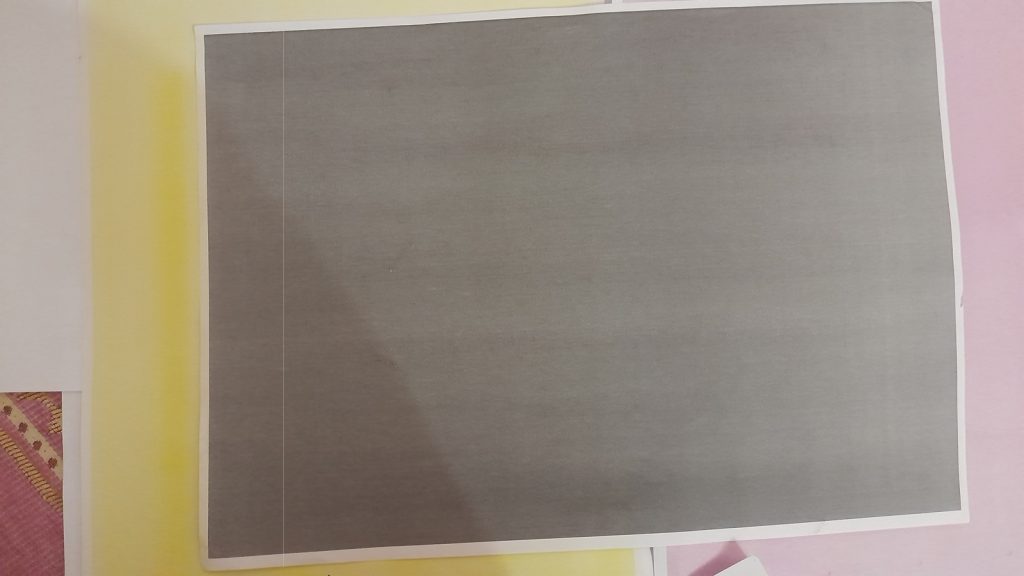
This article presents a structured engineering analysis using electro-photographic physics, optical path geometry, and subsystem behavior in Konica Minolta engines.
Understanding the Failure Geometry
A white line that is:
- Perfectly straight
- Uniform thickness
- Sharp from edge to edge
- Repeating on every page in the same position
corresponds exactly to a line-level interruption in the laser scanning beam.
Because the laser writes the latent image by sweeping horizontally across the drum, any disruption in a specific point along the sweep creates a “no-exposure band” on the drum.
This unexposed band does not attract toner, resulting in a clean white line on the final print.
Physics Behind the White Line Formation
Latent Image Formation
The process depends on the following sequence:
- Drum charging → Drum receives uniform negative potential.
- Laser exposure → Laser writes the image by neutralizing selected areas.
- Development → Toner sticks only to the exposed (discharged) areas.
- Transfer → Fusing
If a portion of the laser beam is blocked, attenuated, or interrupted, that specific region of the drum remains fully charged.
Since fully charged areas reject toner, the result is a white, toner-free stripe.
This “no-write stripe” exactly matches the geometry of the line seen on paper.
Root Cause Categories
Category A — Laser Unit Optical Path Blockage (Most Common)
Any obstruction that prevents a specific portion of the laser beam from reaching the drum will produce exactly one white line.
A.1 Dust or Toner Particle on Laser Glass / Window
- A single speck of dirt on the slit glass (the protective glass between LSU and drum)
- Produces a straight, sharp white line
- The thickness of the line correlates with the particle size and optics focus
A.2 Contamination on Polygon Mirror
A toner particle on one facet of the rotating polygon mirror creates a consistent “dead zone” during scanning.
A.3 LSU Internal Lens Obstruction
Inside the LSU (Laser Scanner Unit):
- Cylindrical lens
- Horizontal sync mirror
- Beam stopper
- Dust on internal optics
Any contamination blocks a narrow segment of the beam.
A.4 Damaged or Burned Laser Diode Output Section
If one laser diode element or emission section becomes weak or dead, the beam loses part of its horizontal sweep.
Category B — Laser Beam Modulation or Drive Failure
B.1 Line Data Not Triggering the Laser
A failure in:
- LD driver IC
- Beam modulation circuit
- Sync signal timing
may create a single consistently missing row of pixels.
B.2 Polygon Motor Speed Instability
Although rare, polygon motor jitter may create missing scan lines that appear as white bands.
Category C — Mechanical Alignment or Assembly Faults
C.1 Misaligned LSU
If the LSU is slightly tilted:
- The beam does not hit the slit glass correctly
- A narrow part of the scan may fall outside the transmissive zone
C.2 Slit Glass Installed with Stress or Non-flatness
A bent or stressed slit glass creates optical distortion that may cause a partial beam cutoff.
Category D — Drum Charging System Interaction
Although less common, the following can mimic a laser interruption:
D.1 Localized Failure in the Drum Charge Roller
A tiny imperfection on the charge roller surface can create a high-potential band the laser cannot fully discharge.
D.2 Charge Leakage Through Drum Surface Defect
A microscopic scratch or coating defect on the drum may retain charge and reject toner in a straight band.
However, these lines tend to be less sharp than laser blocking lines.
The perfect geometric precision of the line usually eliminates this category.
Diagnostic Procedure
A technician should follow a systematic workflow:
Step 1 — Observe Line Geometry
- Perfectly straight?
- Constant thickness?
- Appears on all colors (CMYK) equally?
Step 2 — Inspect Slit Glass
- Open front door
- Locate slit glass above imaging unit
- Clean with dry microfiber
- Never use wet cleaning fluid on LSU optics
Step 3 — Swap Imaging Units (If Model Allows)
If the line appears across all color channels:
- Imaging units are ruled out
- Laser unit becomes primary suspect
Step 4 — Perform Half-Test (Stop Test)
Stop the printer mid-print:
- If the line exists on drum → exposure or development problem
- If line appears only on paper → transfer issue (rare for this fault)
Step 5 — Inspect Laser Scanner Internals (Advanced)
If the problem persists:
- Open LSU (only for advanced technicians)
- Clean polygon mirror and lenses using compressed air
Step 6 — Replace LSU
If:
- Diode failure
- Modulation error
- Internal motor instability
→ The entire LSU unit requires replacement.
Conclusion
A perfectly straight, sharp white line across the page is almost always the result of a precise obstruction or failure in the laser exposure system, not developer issues, not toner starvation, and not mechanical problems.
This failure mode is one of the most geometrically “pure” in electrophotography, making diagnosis straightforward for trained engineers.
In brief:
If the laser cannot write on a narrow band of the drum, that band will reject toner — and a flawless white line will appear on every print.