Color misregistration is one of the few defects on a bizhub color engine where the software-level fix genuinely is the correct first move — right up until it isn’t. This case study covers a real repair on a bizhub Color Series 8 unit (the C258/C308/C368/C458/C558/C658 platform) where a duplicated ghost of the black text and title, along with visible color fringing at the edges of the color patches, survived a full registration calibration and an IDC sensor cleaning, and only cleared once the transfer belt itself was replaced.
| Platform | bizhub Color Series 8 (C258/C308/C368/C458/C558/C658 family) |
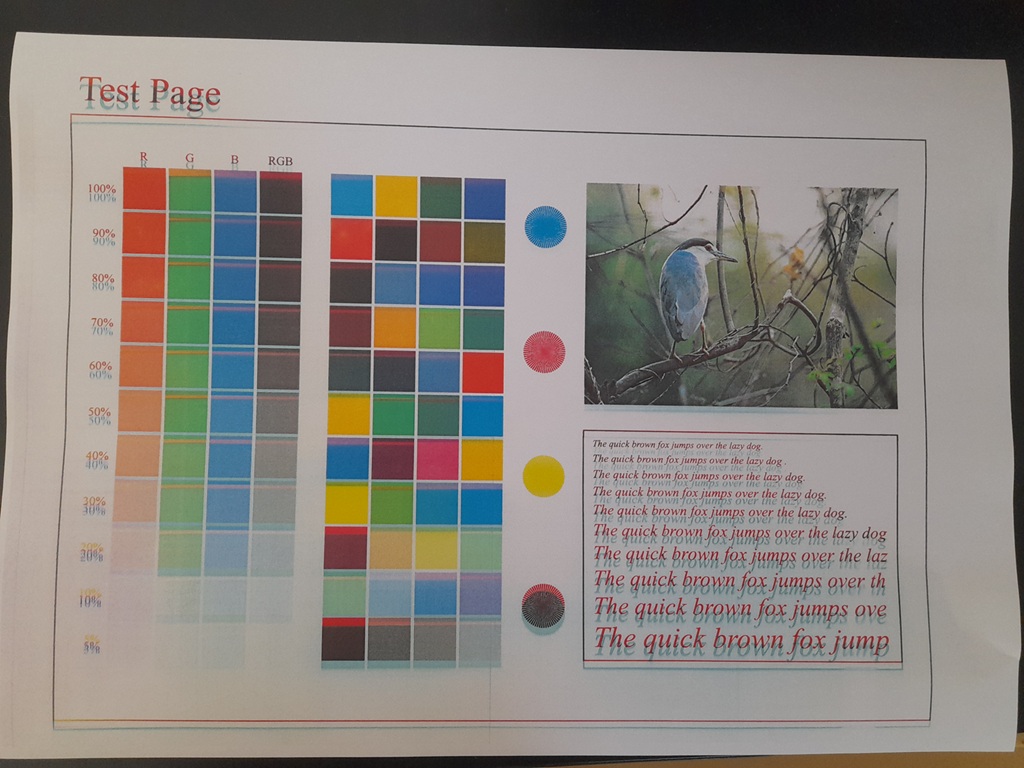
| Symptom | Duplicated/ghosted red offset of black text and title, plus color fringing along patch edges (color plane misregistration) |
| Attempted First | Service mode gradation/registration adjustment; cleaning the IDC sensor |
| Root Cause | Worn/degraded transfer belt (ITB) causing physical tracking drift beyond what registration calibration could correct |
| Fix | Replaced the transfer belt |
| Result | Misregistration eliminated, confirmed on reprint |
The Complaint
The test print showed a clear red duplicate of the black title and body text, offset slightly from the original — the kind of ghosting that immediately says one color plane isn’t landing where it should relative to the others. Looking closer, the same problem was visible as thin colored fringes along the edges of the solid color patches in the grid, where a sliver of a different color showed along one side of each block instead of a clean edge. Every color station was printing correctly on its own; the problem was the alignment between them.
Why the First Fixes Tried Were the Right Instinct
Color-to-color registration is exactly the kind of fault the service mode gradation/registration adjustment exists for — it recalibrates how each color plane is positioned relative to the others based on sensor feedback, and it’s the correct starting point for this symptom rather than jumping straight to parts. Cleaning the IDC (image density control) sensor was also a sound next step, since that sensor reads toner patches on the belt to feed the auto-calibration process, and a dirty or contaminated sensor can feed it bad data and produce exactly this kind of registration error.
Both were tried here, in the right order, before anything was replaced. Neither held.
Why Calibration and Sensor Cleaning Didn’t Fix It
Registration calibration and IDC cleaning both assume the underlying hardware is physically sound and the problem is a measurement or timing correction that software can compensate for. When the transfer belt itself is worn, stretched unevenly, or has developed a tracking irregularity, the physical position of each color’s toner image on the belt drifts in a way that’s inconsistent from rotation to rotation — and that kind of drift is outside what a registration correction can compensate for. The calibration can shift the target, but it can’t fix a belt that isn’t tracking consistently underneath it. That’s the distinction that mattered on this ticket: the software-level tools ruled out timing/sensor error as the cause, which correctly shifted the diagnosis to the belt itself.
Diagnostic Process
With registration calibration and IDC sensor cleaning both completed and the ghosting still present and unchanged, the transfer belt was inspected directly for wear, glazing, or surface degradation consistent with a belt that’s no longer tracking or transferring uniformly.
The Fix
The transfer belt unit was replaced.
Result
A reprint of the same test page after the swap showed clean text with no red ghosting and sharp, fringe-free edges on every color patch.
Takeaway
Registration calibration and sensor cleaning are the correct starting point for a misregistration or ghosting complaint, not a step to skip — but if they don’t hold, that result itself is diagnostically useful. It rules out a timing or sensor-data problem and points at a physical cause underneath the calibration, most commonly the transfer belt. Trying the software fix first, in the right order, is what made the eventual belt diagnosis a confident one rather than a guess.
Refer to service manual for the exact registration/gradation adjustment procedure, IDC sensor cleaning steps, and transfer belt replacement procedure for the specific bizhub Series 8 model on the bench, since these differ across the C258/C308/C368/C458/C558/C658 range.