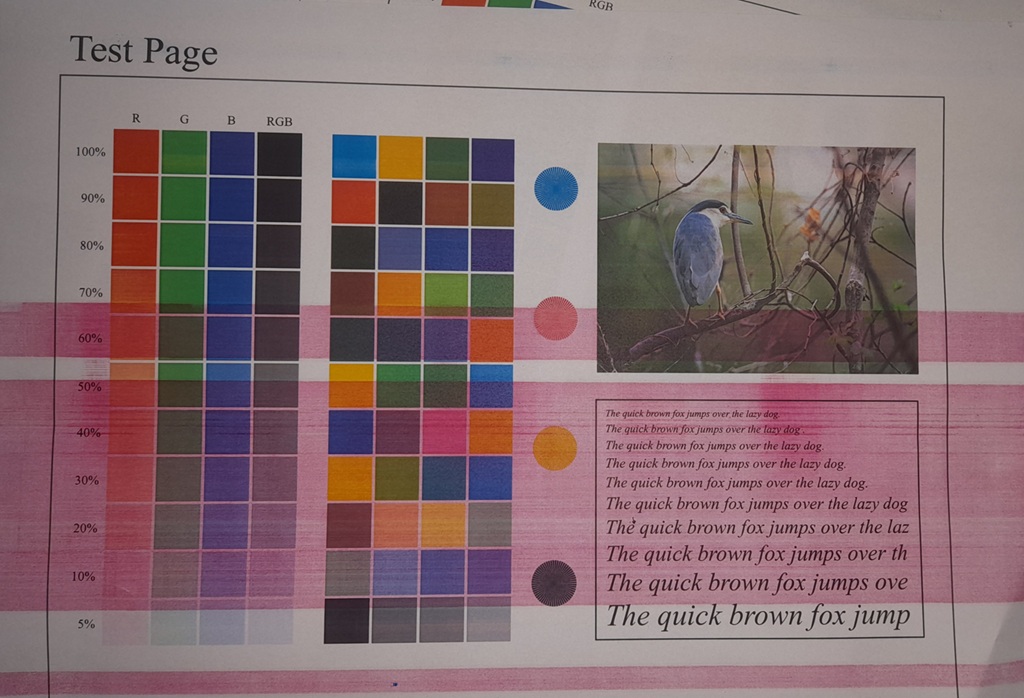
Not every color defect on a bizhub color engine shows up as a clean, crisp line, and that distinction matters more than it looks like it should. This case study covers a real repair on a bizhub Color Series 8 unit (the C258/C308/C368/C458/C558/C658 platform) where wide, soft-edged magenta bands were washing across the entire page — through the color grid, through the text sample, through the photo — and explains why the width and softness of the band pointed at the charge roller rather than the drum.
| Platform | bizhub Color Series 8 (C258/C308/C368/C458/C558/C658 family) |
| Symptom | Wide, soft-edged magenta vertical bands running the full length of the page, overlaying all other content |
| Root Cause | Worn/contaminated Magenta charge roller |
| Fix | Replaced the Magenta charge roller |
| Result | Bands eliminated, confirmed on reprint |
The Complaint
The test print came back with several wide pink/magenta bands running top to bottom, wide enough to look almost like a translucent wash rather than a line. They weren’t confined to one area — they ran straight through the grayscale and color patch grid, through the text sample block, and through the bird photo, tinting everything underneath them without fully obscuring it. Every other color on the page was otherwise clean.
Why Band Width Is the Diagnostic Clue, Not Just the Color
On a vertical defect like this, most techs immediately think “drum” — and that’s the right first instinct for a fine, crisp, hard-edged line, since a scratch or pit on the drum surface is a defect at a single point that repeats in a fixed narrow position every rotation. But this defect wasn’t a fine line. It was a wide, soft-edged band, several times wider than a scratch mark would ever produce, with a gradual, fogged transition at the edges rather than a sharp one.
That width and softness points somewhere else: the charge roller. The primary charge roller (PCR) applies a uniform charge across the full width and length of the drum as both rotate together. If the roller has a soft spot, an uneven conductive layer, or a film of contamination running along part of its length, the drum won’t charge evenly across that band — and toner will develop in the under-charged region as background fog, producing exactly this kind of wide, soft-edged colored wash rather than a crisp scratch-width line.
Diagnostic Process
With a fine scratch-type line already ruled out by the visual width of the band, attention went straight to the Magenta charge roller. It was removed and inspected for contamination, glazing, or an uneven surface along its length — the kind of wear that develops gradually rather than from a single impact or scratch, which fit the gradual, fogged character of the defect on paper.
The Fix
The Magenta charge roller was replaced.
Result
A reprint of the same test page after the swap came back clean — no banding anywhere on the sheet, and the color grid, text sample, and photo all printed without the magenta wash that had been running through them.
Takeaway
Width and edge sharpness are worth reading carefully before deciding what a vertical defect is. A narrow, hard-edged line points at a localized surface defect — typically the drum. A wide, soft-edged band or wash points at something applying an uneven condition across an area — typically the charge roller. Making that call correctly from the test page, before opening the machine up, is what kept this repair to one correct part instead of a drum swap that wouldn’t have fixed it.
Refer to service manual for the correct charge roller part number and access procedure for the specific bizhub Series 8 model on the bench, since these details vary slightly across the C258/C308/C368/C458/C558/C658 range.